Java Servlet API
The Servlet API is an important feature in building Java web applications. Servlets run in a servlet container which is a web or application server that provides network services for receiving requests and sending responses.
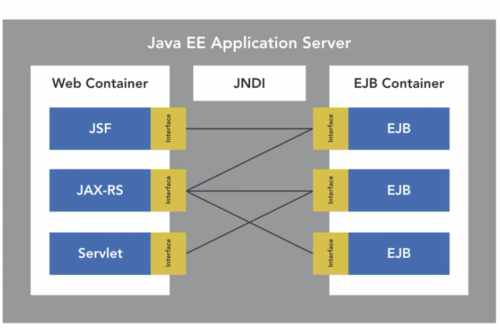
All Java EE application servers support the servlet specification and contains a servlet container where servlets can be initialized.
Once a servlet is initialized, it is available to process HTTP requests sent from a web browser using a servlet interface method that corresponds to the HTTP method of the request. Dynamic content is then generated in a response that is sent back to the browser. The servlet manages functionality required to interact with a database or generate dynamic HTML content for example.
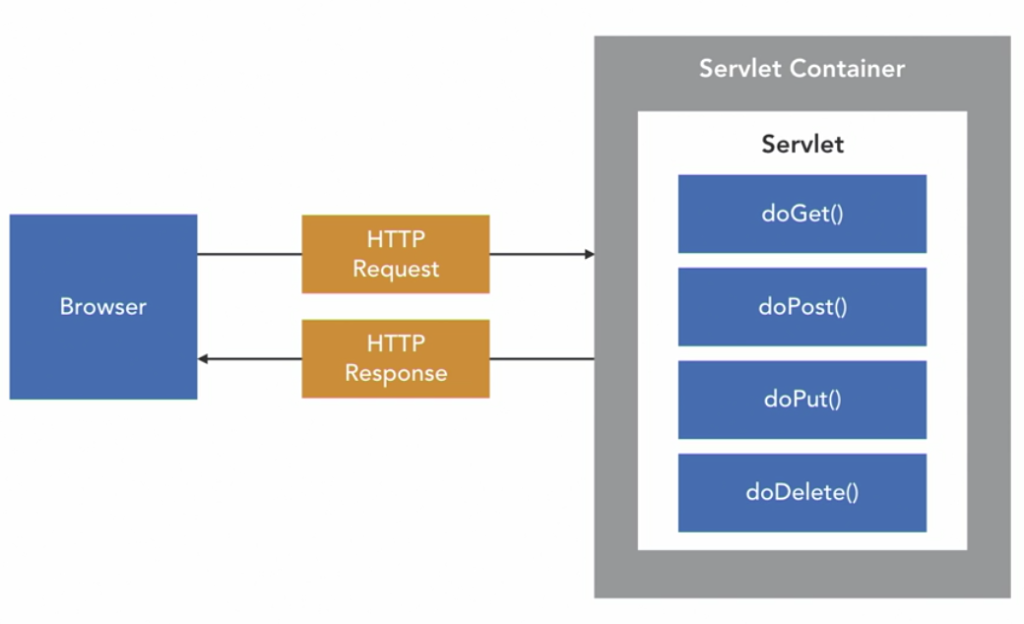
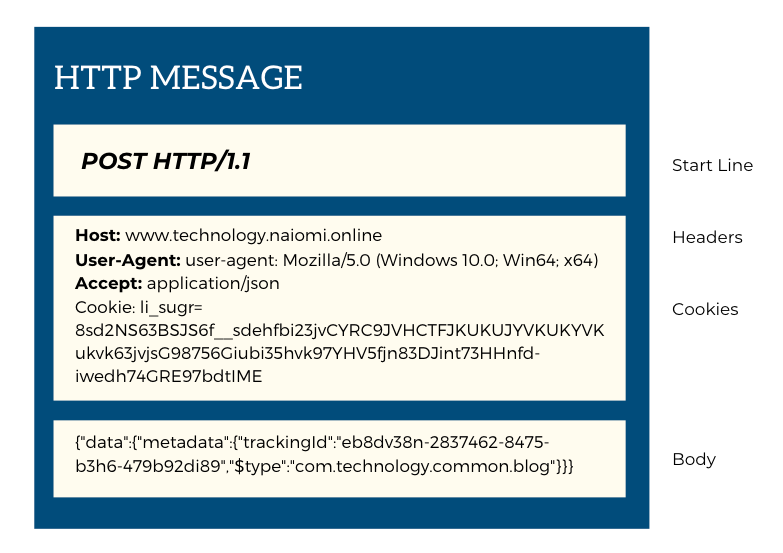
The servlet interface contains methods that can be implemented for processing requests related to HTTP methods eg. POST, GET, PUT, DELETE, etc. as well as providing access to the HTTP message for the creation of headers, cookies and body content.
Servlets are configured in the application with annotations from Java EE version 7, although XML based configuration could be used in previous versions.
For detailed information of the HTTPServlet interface, documentation can be viewed here.
Asynchronous processing is supported to enable the servlet container to process resources more efficiently by releasing threads during long running processes.
The servlet API provides an abstraction over low-level interfaces for networking and request parsing.
@WebServlet("/ExampleServlet")
public class ExampleServlet extends HttpServlet {

  protected void DoGet(HttpServletRequest request, HttpServletResponse response)
     throws ServletException, IOException {
     response.getWriter().append("Hello Naiomi");
  }

  protected void DoPost(HttpServletRequest request, HttpServletResponse response)
     throws ServletException, IOException {
     doGet(request, response);
  }
}
Additional interfaces
| Interface | Description |
| HttpSession | Allows state to be stored for a user across one or more HTTP requests by a user |
| Cookie | Object to send a small amount of information to the browser that will be sent back at a later time |
| ServletContext | Provides methods to communicate with the servlet container |
| Filter | Provides tasks on a request to a servlet or on the response from a servlet |
Filters
Filters can be used with a Servlet to enable some logic or transformations to be applied to requests and responses processed by a Java application. Common use cases include logging or security applied to the requests received and the response sent.
//Servlet Filter implementation for Logging

@WebFilter("/*")
public class LoggingFilter implements Filter {

   public void doFilter(ServletRequest request, ServletResponse response,
       FilterChain chain) throws IOException, ServletException {

      request.getParameterMap().entrySet().stream().forEach(entry ->{
	System.out.println(String.format("%s:%s", entry.getKey(), entry.getValue()[0]));
      });

      chain.doFilter(request, response);
   }
}
Event Listeners
A Listener is an interface that receives notifications about events occurring in the web application and is used to handle events such as:
- Application events at app start/end
- Session events at Session start/end
- Request events at Request start/end
- Attribute events when attribute is added/removed
The listener is notified when the event occurs and can perform an action in response to the event.
Listener interfaces
- ServletContextListener
- ServletContextAttributeListener
- HttpSessionListener
- HttpSessionAttributeListener
- HttpSessionIdListener
- ServletRequestListener
- ServletRequestAttributeListener
Simple context listener
import jakarta.servlet.ServletContextEvent;
import jakarta.servlet.ServletContextListener;

public class SimpleListener implements ServletContextListener {

    @Override
    public void contextInitialized(ServletContextEvent sce) {
        sce.getServletContext().log("Application started");
    }

    @Override
    public void contextDestroyed(ServletContextEvent sce) {
        sce.getServletContext().log("Application now ended");
    }
}
If you choose to use the web.xml to register the listener instead of using the @WebListener annotation:
<listener>
   <listener-class>com.listeners.SimpleListener</listener-class>
</listener>
Simple request listener
import jakarta.servlet.ServletRequestEvent;
import jakarta.servlet.ServletRequestListener;
import jakarta.servlet.annotation.WebListener;

@WebListener
public class SimpleRequestListener implements ServletRequestListener {

    @Override
    public void requestInitialized(ServletRequestEvent sre) {
        sre.getServletContext().log(String.format("Application called from %s", sre.getServletRequest().getRemoteAddr()));
    }

    @Override
    public void requestDestroyed(ServletRequestEvent sre) {
        sre.getServletContext().log(String.format("Application call ended from %s", sre.getServletRequest().getRemoteAddr()));
    }
}
Asynchronous support
Servlets can often be expensive when events such as remote web service requests or CRUD operations on the database are required. When these operations occur frequently, the web application server can experience poor performance due to thread starvation. Threads are valuable resources for web containers so it’s important to use them efficiently.
Asynchronous support, introduced from Java EE 7 assist with efficient thread utilization.
//Implementing async support on a Servlet

@WebServlet(urlPatterns= "/ExampleServlet", asyncSupported = true)
public class ExampleServlet extends HttpServlet {
	private static final long serialVersionUID = 1L;

	public CatalogServlet() {
		super();
	}

	protected void doGet(HttpServletRequest request, HttpServletResponse response)
           throws ServletException, IOException {
		response.getWriter().append(request.getParameter("name"));
	}

	protected void doPost(HttpServletRequest request, HttpServletResponse response)
			throws ServletException, IOException {

		AsyncContext asyncContext = request.startAsync();

		asyncContext.start(new Runnable() {

		@Override
		public void run() {

		   try {
			Thread.sleep(5000);
			System.out.println("Print the response");
			System.out.println("Reponse returned by: " + Thread.currentThread().getName());
			returnResponse(request, response);
			asyncContext.complete();

		   } catch (InterruptedException e) {
			e.printStackTrace();
		     } catch (IOException e) {
			 e.printStackTrace();
		       }

		  }

	        });

		System.out.println("Initial Request: " + Thread.currentThread().getName());

	}

	private void returnResponse(HttpServletRequest request, HttpServletResponse response) throws IOException {
		...
	}