Java Data Structures
What is a data structure?
In any application that you are building, there would most likely be data involved. You may require to group and sort that data in a particular way or access the data to make specific changes. A data structure describes how the data is grouped together, it provides a place to store the data, it exposes a way to access the data as well as defines how the data relates to each other. Data can be different types such as numbers, strings, objects, etc.
A data structure can also contain other data structures eg. a list of lists.
How to choose a data structure
The are many data structures in existence but how would you know which one to use? It depends on the use case and the following should be considered:
- Is the size of the data fixed or will it change?
- Are duplicates allowed?
- Is the order of the data important?
- Does the data need to be changed often?
- Does the data need to be accessed often?
Performance and data consistency should come to mind when evaluating these considerations to determine the best data structure to be implemented for the use case.
Arrays
Arrays are the simplest form of a data structure. An array is an object that contains a fixed number of elements of the same data type. When defining an array, the number of elements is set up front because the objects are stored in directly adjacent memory locations and cannot be changed after it is allocated. If the number of elements in the array are required to change, an entirely new array would have to be created. Arrays support primitive data types or objects. Every element in the array would have to be the same data type.
Arrays are indexed and start at zero [0]. Each object in the array can be accessed by the index, from 0 up to the array length minus 1. If you try to access an index that is outside the scope of the array, an array index out of bounds exception will be triggered.
Java arrays class & methods
Java contains an arrays class that exposes utility methods that can be performed on arrays.
| Method | Description |
| toString() | Convert to the array into a readable string |
| asList() | Convert a list into an array |
| sort() | Sorting the array |
| binarySearch() | Searching the array |
public class arrayExample {

   public static void main(String[] args) {

       //create an array of type String
       String[] weekdays = new String[]{
           "Monday",
           "Tuesday",
           "Wednesday",
           "Thursday",
           "Friday",
           "Saturday",
           "Sunday"
       }

       //display the array in a readable format
       System.out.println(Arrays.toString(weekdays));

       //display the value stored in index 2
       System.out.println(weekdays[2]);

       //iterate through an array and display each day
       for (String day : weekdays) {
           System.out.println("Week day : " + day);
       }

       //convert each day to UPPERCASE
       for (int i = 0; int < weekdays.length; int++) {
           weekdays[i] = weekdays[i].toUpperCase();
           System.out.println(weekdays[i])
       }

       //change the value stored in index 4
       weekdays[4] = "Partyday";

       //increment the value of each element in the array
       int[] values = new int[]{1,2,3,4,5};
       for (int i = 0; i < values.length; i++) {
           values[i] = values[i] + 1;
           System.out.println(values[i]);
       }
   }
}
The Collection interface
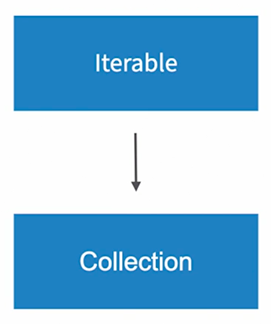
Most data structures in Java implement the interfaces from the collection framework. Collections can change it’s size and cannot store primitive types. There are several interfaces that extend the collection interface such as list, queue, stack, set.

The methods that implement the concrete classes of the collections interface are consistent across the API.
The Iterable interface
Classes in the framework can be iterated over with an iterator object. The forEach() method defined in the Iterable interface.
LinkedLists
Each element in a LinkedList has a reference to the previous element as well as the next element.
ArrayLists are quicker at randomly accessing elements but LinkedLists are quicker at adding or removing elements.
LinkedLists have useful methods such as addFirst(), addLast(), removeFirst() and removeLast() to add or remove elements from the front or back of the LinkedList.
LinkedLists are not synchronized and not thread safe. If there are multiple threads modifying the list concurrently, they might overwrite each other’s changes.
import java.util.Collections;
import java.util.LinkedList;
import java.util.List;

public class LinkedListExamples {

  public static void main(String[] args) {

    //implementing a linked list to add fruit
    LinkedList<String> shoppingList = new LinkedList<>();
    shoppingList.add("apple");
    shoppingList.add("banana");
    shoppingList.add("pear");
    System.out.println(shoppingList);

    //add another data element at index 1
    shoppingList.add(1, "mango");
    System.out.println(shoppingList);

    //remove the first element in the LinkedList
    shoppingList.removeFirst();
    System.out.println(shoppingList);

    //Synchronizing the LinkedList to make it thread safe
    List<String> synchronizedShoppingList = Collections.synchronizedList(shoppingList);
    System.out.println(synchronizedShoppingList);

    //iterate over the list with streams
    list.stream().forEach(System.out::println);

    //iterate over the list with lambdas
    list.forEach(item -> System.out.print(item + "->"));

  }
}
Stacks
The first data element that is added to the stack is the last element that is taken out.
import java.util.ArrayDeque;
import java.util.Deque;

public class StackExamples {

  public static void main(String[] args) {

    Deque<String> stack = new ArrayDeque<>();
    stack.push("First request");
    stack.push("Second request");
    stack.push("Third request");
    System.out.println(stack);
    System.out.println(stack.peek());
    stack.pop();
    System.out.println(stack);
    stack.poll();
    System.out.println(stack);

  }

}
Queues
In a queue data structure, the first data element that is added is the first data element that is taken out. There are multiple ways to implement a queue, namely, ArrayDeque, LinkedList & PriorityQueue.
import java.util.Queue;


public class ArrayDequeExample {

   public static void main(String[] args) {
      Queue<String> queue = new ArrayDeque<>();
      queue.offer("strawberry");
      queue.offer("banana");
      queue.offer("apple");
      System.out.println(queue);

      //view first data element
      System.out.println(queue.peek());

      //remove the first data element
      queue.poll();
      System.out.println(queue);
   }
}You May Also Like