Object-oriented programming concepts in Java
Inheritance in Java
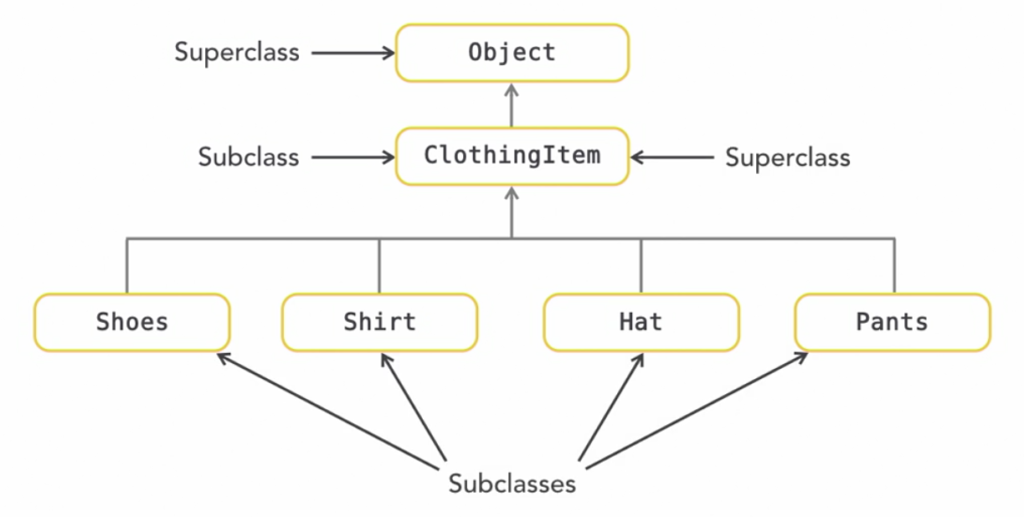
Inheritance is a way of defining relationships between classes and supports easier debugging and maintenance. A class can inherit and extend functionality from a single direct superclass. The extends keyword creates an inheritance relationship.
Classes can however, implement multiple interfaces. We refer to a class that inherits from another as a parent/child, base/derived or a superclass/subclass relationship.
All classes are derived from an Object and don’t need any special notation. If a class isn’t final, it can be extended. Superclass members are inherited unless marked as private.
Superclasses
//Example superclass
public class ClothingItem {
   private String size
   public String getType() {
      return "Clothing Item";
   }
   public String getSize() {
      return size;
   }
   public void setSize(String size) {
      this.size = size;
   }
}
//Example subclass
public class Hat extends ClothingItem {

   @Override
   public String getType() {
      return "Hat";
   }
}
Polymorphism in Java
Polymorphism is one of the core concepts of Object-Oriented Programming (OOP). The word “polymorphism” means “many forms.” In Java, polymorphism allows objects to be treated as instances of their parent class rather than their actual class. It enables a single method or behavior to have different implementations depending on the object calling it.
Polymorphism is mainly divided into two types:
Runtime Polymorphism (Method Overriding)
This occurs when multiple methods in a class have the same name but differ in:
- Number of parameters
- Type of parameters
- Sequence of parameters
The method to be invoked is determined at compile time.
class Calculator {
    // Overloaded methods
    int add(int a, int b) {
        return a + b;
    }

    double add(double a, double b) {
        return a + b;
    }

    int add(int a, int b, int c) {
        return a + b + c;
    }
}

public class Main {
    public static void main(String[] args) {
        Calculator calc = new Calculator();
        System.out.println(calc.add(2, 3));         // Calls int add(int, int)
        System.out.println(calc.add(2.5, 3.5));     // Calls double add(double, double)
        System.out.println(calc.add(1, 2, 3));      // Calls int add(int, int, int)
    }
}
Compile-time Polymorphism (Method Overloading)
This occurs when a subclass provides a specific implementation of a method already defined in its parent class. The method to be invoked is determined at runtime, based on the object type.
class Animal {
    void sound() {
        System.out.println("Animal makes a sound");
    }
}

class Dog extends Animal {
    @Override
    void sound() {
        System.out.println("Dog barks");
    }
}

class Cat extends Animal {
    @Override
    void sound() {
        System.out.println("Cat meows");
    }
}

public class Main {
    public static void main(String[] args) {
        Animal myAnimal;  // Reference of type Animal

        myAnimal = new Dog();  // Object of type Dog
        myAnimal.sound();      // Calls Dog's implementation of sound()

        myAnimal = new Cat();  // Object of type Cat
        myAnimal.sound();      // Calls Cat's implementation of sound()
    }
}
Why Use Polymorphism?
- Code Reusability: You can use the same code to work with objects of different types.
- Flexibility: You can introduce new subclasses without changing existing code.
- Scalability: Adding new behaviors to existing systems becomes easier.
Key Notes:
- Method Overloading is an example of compile-time polymorphism.
- Method Overriding is an example of runtime polymorphism.
- Polymorphism works with inheritance and interfaces.
- Dynamic Method Dispatch: The process of determining which overridden method to invoke at runtime.
Polymorphism with interfaces
interface Shape {
    void draw();
}

class Circle implements Shape {
    public void draw() {
        System.out.println("Drawing a Circle");
    }
}

class Rectangle implements Shape {
    public void draw() {
        System.out.println("Drawing a Rectangle");
    }
}

public class Main {
    public static void main(String[] args) {
        Shape shape;  // Interface reference

        shape = new Circle();
        shape.draw();  // Calls Circle's draw method

        shape = new Rectangle();
        shape.draw();  // Calls Rectangle's draw method
    }
}

You May Also Like
Inversion of control in Spring

Understanding Project Loom’s Virtual Threads